Google Search Query Alerts in Webmaster Tools
It can be quite time consuming to analyse everything inside Webmaster Tools and prioritise the data by importance. For this reason, Google has started rolling out alerts for Webmaster Tools data such as crawl errors to save webmasters time.
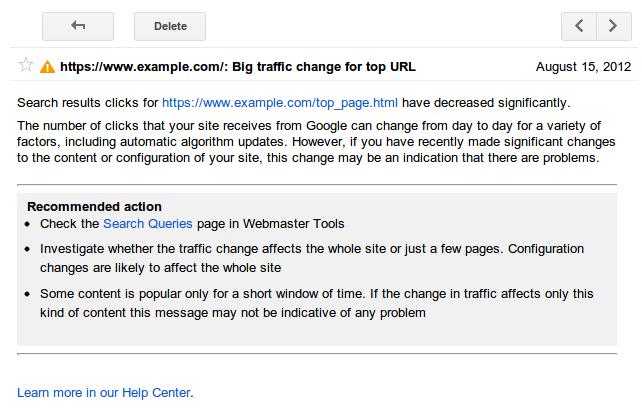
As of today, Google has announced another new feature to Webmaster Tools that reports on sudden spikes or drops in impressions and clicks on your pages. Many webmasters look at this data frequently enough to not need these alerts, but for those that don’t have the time to constantly look at it, these can save you a lot of time! Google says:
“We process the data for your site and attempt to detect events that could be most interesting to you.”
The alerts look like this:
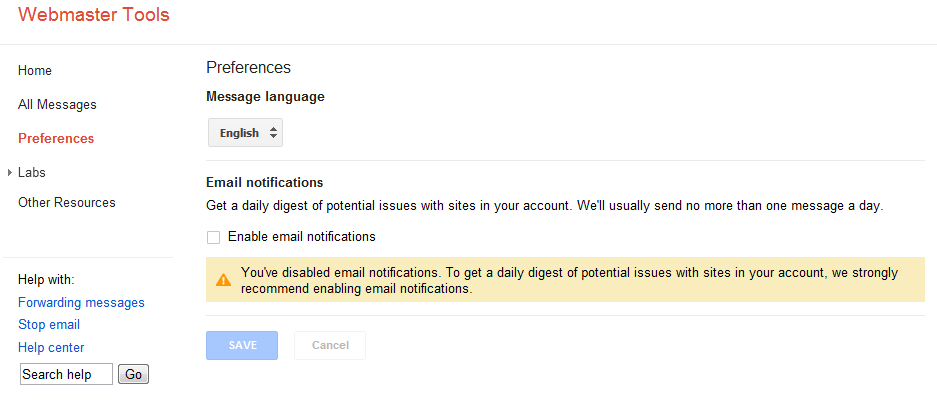
To set them up, you need to go to the preferences section of Webmaster Tools:
- On the Webmaster Tools home page, click Preferences
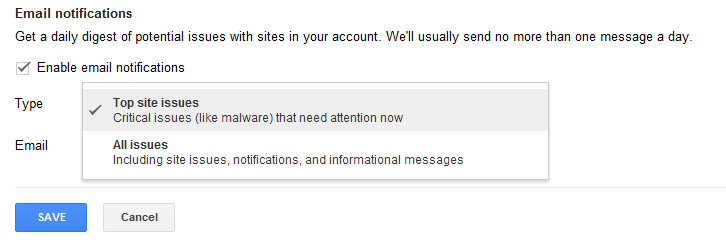
- Select the type of alerts you wish to receive (All or only Critical)
- Select the email address you want to use (this will typically be the email associated with your account)
- If you want to add an email address that is not listed you can add them through Personal settings in your Google account settings.
Pro tip: Google has yet to test and refine what it’s calling the “sensitivity threshold” on these alerts. That just means they haven’t exactly worked out what should trigger them (i.e. minor changes v.s. major changes) so it’s best you still check this data regularly until all the new release bugs are worked out.
Hi Matthew.
This is another good move by Google letting webmasters know about their site’s position and in terms of traffic is pretty interesting.
Would be good to see if this is improved over time.
Definitely agree – they’re becoming more transparent and helpful which is nothing but great news for those in SEO!
I definitely expect to see not only Google Webmaster Tools overall continue to be improved but these alerts and messages as well! 😀